
SSO Isn't Authorization: Controlling VPN Access with SAML Custom Claims or RADIUS
SAML proves who a VPN user is, not what they can reach. How SAML + RADIUS and custom SAML claims each restore group-based access, and what vendors must support.
Moving your VPN to SSO feels like an easy win. Users sign in with the same account they use everywhere else, MFA comes along for free, and nobody has to remember a separate VPN password. Then someone notices that the contractor who logged in this morning got the same access as the CFO.
I see this with clients all the time, across firewall and VPN vendors. SSO fixed the login, but it quietly removed the part that decided what each user was allowed to do once they were connected. There are two solid ways to put that control back, and which one is right depends on how much complexity your environment actually needs.
Authentication Is Not Authorization
These two words get used interchangeably, but they answer different questions:
- Authentication asks: are you who you say you are? Username, password, MFA.
- Authorization asks: now that we know who you are, what are you allowed to do? Which networks you can reach, which DNS servers you use, whether you get a full or split tunnel.
SAML was built to solve the first question extremely well. The identity provider (IdP), such as Entra ID, Duo, or Okta, checks the user’s credentials and MFA, then tells the service provider (the firewall or VPN, in this case) that the user is legitimate. What happens after that has traditionally been left up to the service provider.
Think of the IdP as the security desk that checks your badge at the front door. It confirms who you are. It doesn’t decide which rooms your badge opens. That part still has to come from somewhere.
With a plain SSO setup, that “somewhere” is often nothing. Everyone who authenticates lands in the same default policy, with the same access.
The Traditional Fix: SAML for Authentication, RADIUS for Authorization
Many firewall and VPN platforms support splitting the job in two. The user authenticates against the SAML IdP, and the firewall then asks a RADIUS server what that user should get. The RADIUS server is usually Cisco ISE or Microsoft NPS.
The RADIUS server answers with an Access-Accept that carries attribute-value pairs (AVPs) telling the firewall what to do with the session. On Cisco Secure Firewall, for example, a common choice is the Class attribute carrying the name of the group policy to apply, such as OU=GP_CONTRACTORS. Other vendors use their own attributes for the same purpose.
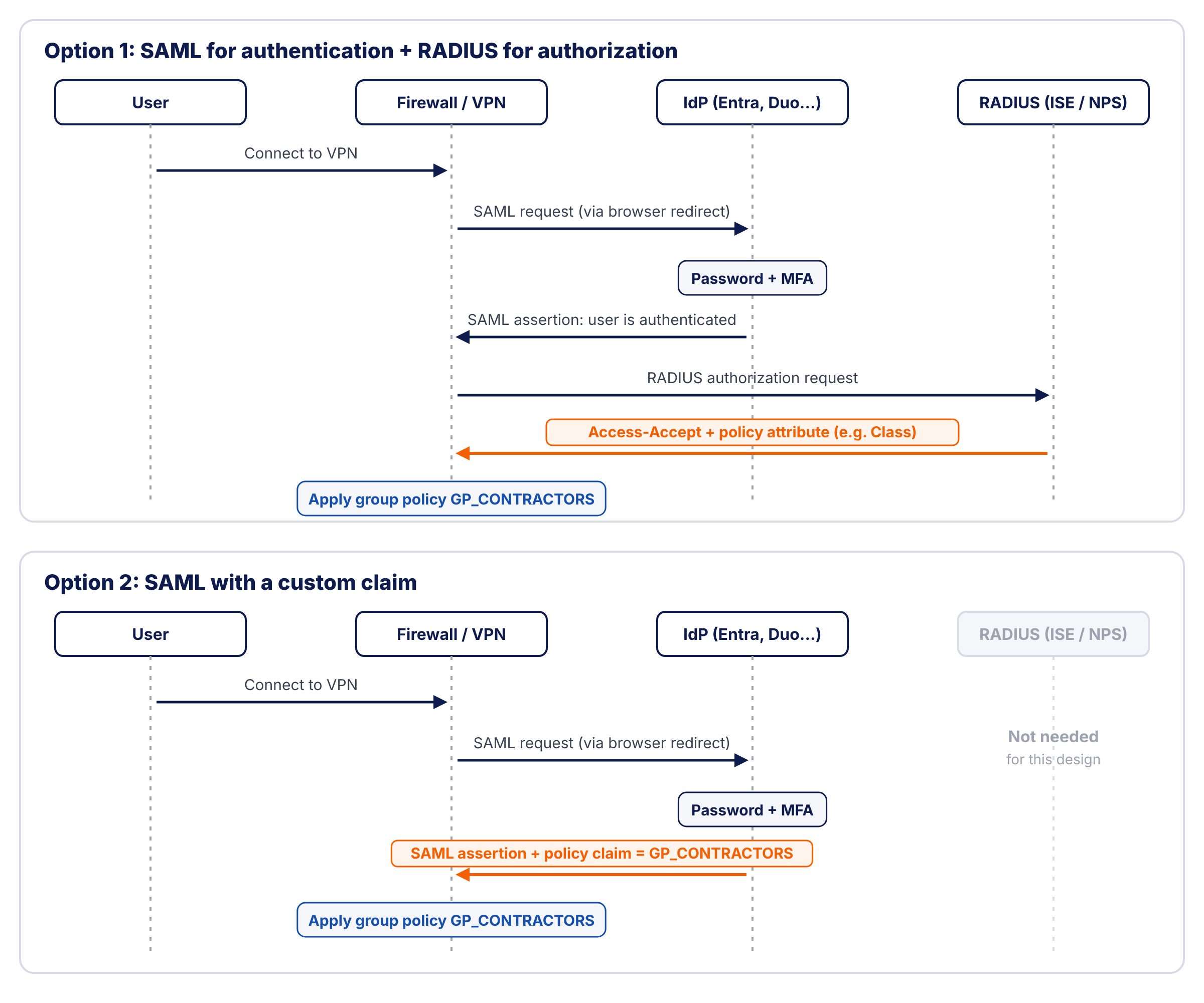
Both designs authenticate the same way. The difference is where the authorization answer comes from.
I’ve deployed and supported this pattern in a lot of environments, with both ISE and NPS, and it’s a strong design. It gives you:
- Rich policy. A platform like ISE can make authorization decisions on far more than group membership: device posture, location, time of day, and more.
- One policy engine for everything. The same RADIUS policy can cover VPN, wireless, wired 802.1X, and device administration.
- Accounting and visibility. RADIUS accounting gives you a record of who connected, when, and with what authorization.
The cost is complexity. It’s another server (or cluster) to build, license, patch, and keep highly available. The groups that drive authorization have to be available to the RADIUS server, which often means directory integration or group sync. And every login now depends on two systems instead of one.
If you already run ISE, that’s an easy trade. If the only thing you need is “contractors get limited access, employees get full access,” it can be a lot of infrastructure for one decision.
The Simpler Option: Custom SAML Claims
There’s a lighter way to get group-based authorization, as long as your firewall or VPN supports it: have the IdP send the authorization answer itself, inside the SAML response.
In plain terms: after the IdP confirms who the user is, it adds a short instruction to its reply, something like “put this person in the Contractors policy.” The firewall reads that instruction and applies it. The only requirement is that the firewall knows how to read the instruction.
In technical terms: this is the same idea as a RADIUS or TACACS+ response. A RADIUS Access-Accept carries AVPs that tell the network device what to do with the user it just authenticated. A SAML assertion can carry attributes, also called claims, that do the same job. A custom claim is simply an attribute you define in the IdP and include in the assertion.
Here’s what that looks like inside the SAML response the firewall receives. The attribute name depends on the vendor:
<saml:AttributeStatement>
  <saml:Attribute Name="group_policy">
    <saml:AttributeValue>GP_CONTRACTORS</saml:AttributeValue>
  </saml:Attribute>
</saml:AttributeStatement>
The big advantage is that the groups you already maintain in your IdP drive the decision directly. There’s nothing to sync to a RADIUS server and no extra server in the login path. And because IdPs support conditional claims, the value they send can change based on which groups the user belongs to. I’ve built this with both Entra ID and Duo. Other enterprise IdPs generally offer something similar, but confirm how yours handles conditional attributes before you design around it.
What It Looks Like: Contractors vs. Employees
Say you’re building a remote access VPN and you want two levels of access:
| Policy | Who gets it | What it does |
|---|---|---|
| GP_CONTRACTORS | Members of the Contractors group | Split tunnel to a short list of resources, separate DNS servers, limited scope |
| GP_EMPLOYEES | Members of the Employees group | Full tunnel, internal DNS servers, normal employee access |
The setup follows the same three steps on any platform that supports it:
- Build the policies on the firewall or VPN. Create GP_CONTRACTORS and GP_EMPLOYEES with the access each group should have.
- Set up SAML as you normally would. Nothing changes about authentication.
- Add a conditional claim in the IdP. In the enterprise application for the VPN, send the claim name your vendor expects, with a value that depends on group membership: Contractors get
GP_CONTRACTORS, Employees getGP_EMPLOYEES.
When the user signs in, the IdP authenticates them, adds the claim, and the firewall applies the matching policy. No NPS, no ISE, no group sync.
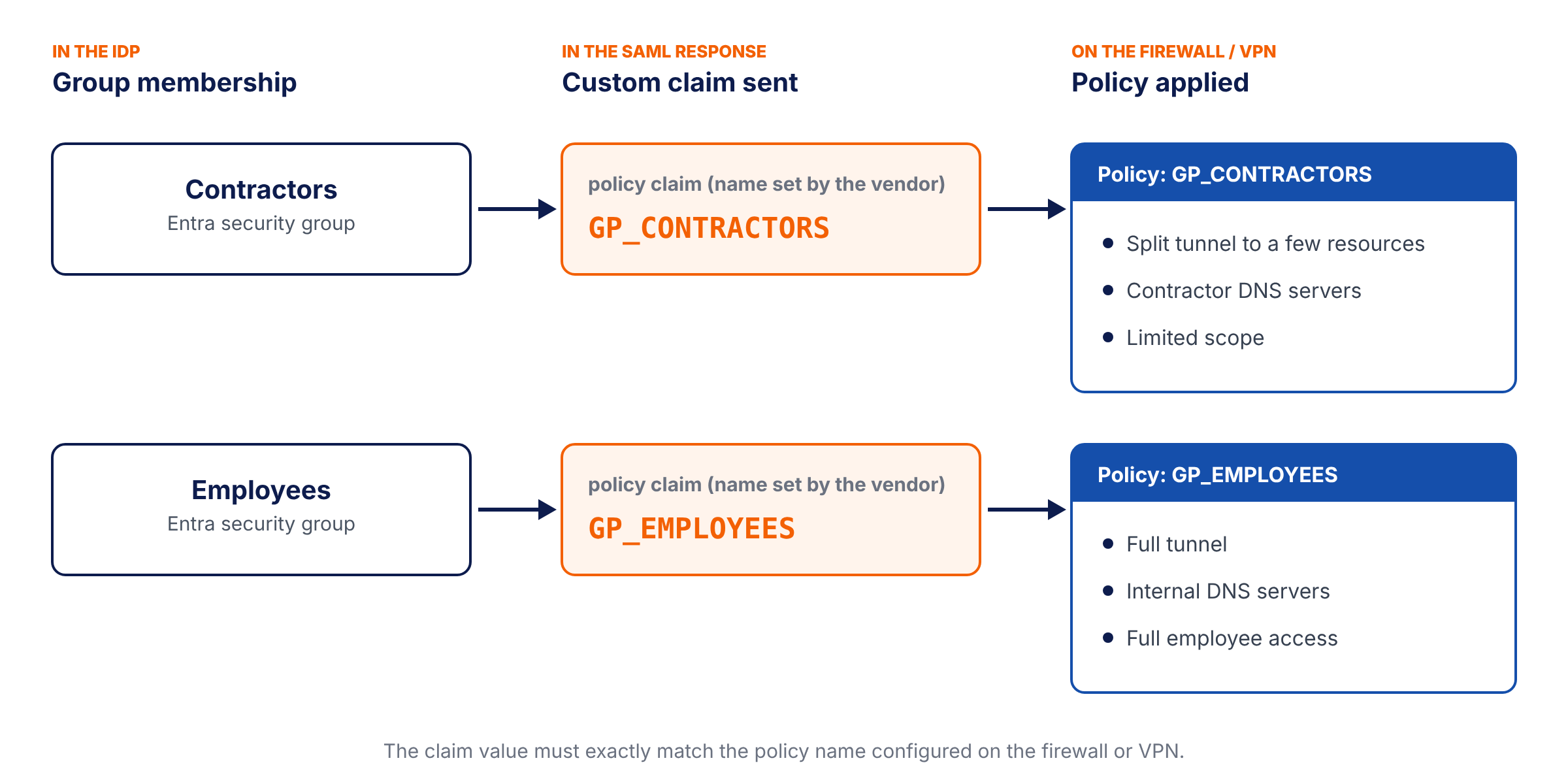
Group membership in the IdP picks the claim value. The claim value picks the policy on the firewall.
The claim value has to match the policy name on the firewall exactly. A typo or a case mismatch means the user won’t get the policy you intended, and will typically land in the default policy instead.
Where Vendor Support Stands Today
Custom claims only work if the service provider knows to look for them, and that’s where vendors differ today. Some let you choose your own claim name. Others expect one specific name. And some don’t support it yet in their current release. Two examples I’ve worked with:
- Cisco Secure Firewall (FTD managed by FMC) has this built in for remote access VPN. It expects a fixed claim name,
cisco_group_policy, whose value is the name of the group policy to apply. - Cisco Meraki doesn’t act on custom SAML claims out of the box in its current release line. At the time of writing, you can open a case with Meraki TAC to enable the beta SAML groups feature for client VPN. Once it’s on, you choose the claim name Meraki should expect, create a custom claim with that same name in your IdP, and build your group-based conditions the same way.
Those two show the range: one product with a fixed claim name, another where you define it, and support that can depend on the release you’re running. Other vendors are at different points along the same path. Because claims are part of the SAML standard, I expect support to become common across firewall and VPN platforms.
Before you commit to this approach on any platform, confirm three things:
- Does the product act on custom SAML claims at all? Check the version you’re actually running.
- What claim name does it expect? Fixed by the vendor, or one you define.
- What can the claim control? Usually a group policy or connection profile. Anything beyond that varies by vendor.
If the answer to the first question is “not yet,” that’s not the end of the conversation. Ask the vendor’s support team whether a beta or roadmap feature exists, the way Meraki’s does, and submit a feature request if it doesn’t. Vendors build what customers ask for.
Which Approach Fits?
| SAML + RADIUS (ISE / NPS) | SAML with custom claims | |
|---|---|---|
| Where authorization lives | RADIUS server policy | Conditional claims in the IdP |
| Extra infrastructure | RADIUS server, plus group integration | None |
| What can drive access | Groups, posture, device type, location, and more | Mostly group membership |
| Vendor support needed | RADIUS authorization (widely supported) | Custom claim support (growing) |
| Best fit | Larger or regulated environments, or anywhere ISE already runs | Lean teams that want group-based access with the IdP they already have |
Neither option is the “right” one in every case. If you need posture checks, device-based decisions, or one policy engine across VPN, wireless, and wired, SAML with RADIUS is worth the extra moving parts. If you need contractors and employees to land in different policies, and your platform supports it, custom claims get you there with less to build and less to break.
SSO Should Make Access Simpler, Not Flatter
Moving to SSO and MFA is the right call. But a login that’s harder to steal and then hands every user the same access has only solved half the problem. Authorization has to be designed on purpose, not inherited from whatever the default policy happens to be.
At Rascon Technology Services, we build both designs: SAML with ISE or NPS when the environment needs a full policy engine, and SAML with custom claims when simplicity wins. We’ve done it with Entra ID and Duo on Cisco Secure Firewall and Meraki, and we’ll work through it on whatever platform you run. That means testing what your firewall and IdP support today and, where a feature is missing, working with the vendor to get it on the roadmap.
If your VPN moved to SSO and everyone now gets the same access, or you’re planning that move and want to get authorization right the first time, let’s talk.
Did your VPN move to SSO, and now everyone gets the same access?
Get a free 30-minute VPN authorization review. We’ll look at your IdP and firewall setup and tell you whether custom claims or RADIUS is the right fit.